 |
| newAD2gui – Settings
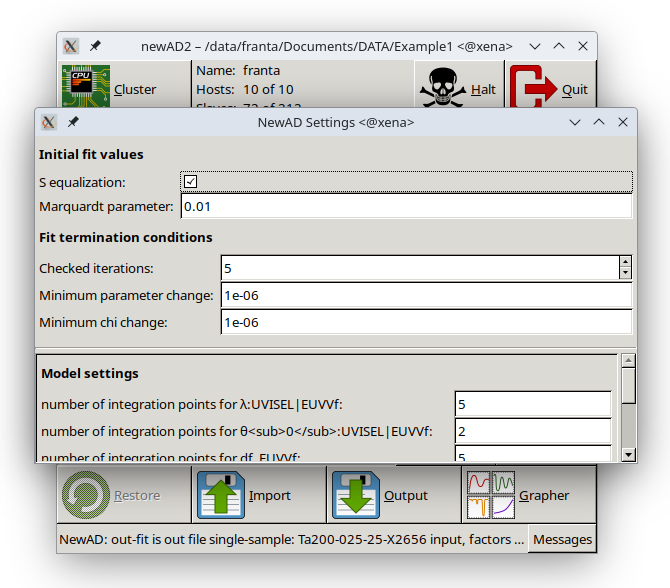
The window with all five built-in fitting-algorithm settings (equivalent to the text-mode let command), grouped into two sections. Initial fit values: the S equalization checkbox (balanced vs. standard algorithm, see the Regression method page) and the Marquardt parameter value. Fit termination conditions: Checked iterations, Minimum parameter change and Minimum chi change – the conditions under which the fit is considered finished. All fields are editable only outside a running calculation; submitting an invalid value silently reverts it to the last valid one.
Below Fit termination conditions (and still above the separator line that precedes Model settings) is the Factors/Targets table – one row per currently loaded experimental dataset (named by its identifier). Which of the two columns is shown and editable is determined by the S equalization checkbox above: off – Factors (that dataset's factor), on – Targets (that dataset's target sum of squares). This is the graphical counterpart of the text-mode factor/target commands (see the newAD2 page) – like those, it always changes only the one dataset whose field was edited. Not editable outside a running calculation, same as the other settings on this page; the table stays empty (it does not appear at all) if no experimental data is loaded.
If the currently selected model registers any settings of its own (see the static attribute on the c-Si page, namely precision_cSi), a Model settings section appears below the separator line, with one row per such setting. It behaves just like the five built-in settings above – the value is sent by pressing Enter in the field, and it is editable only outside a running calculation. For a model with no settings of its own, this section stays empty (it does not appear at all).