 |
| newAD2gui – Parameters
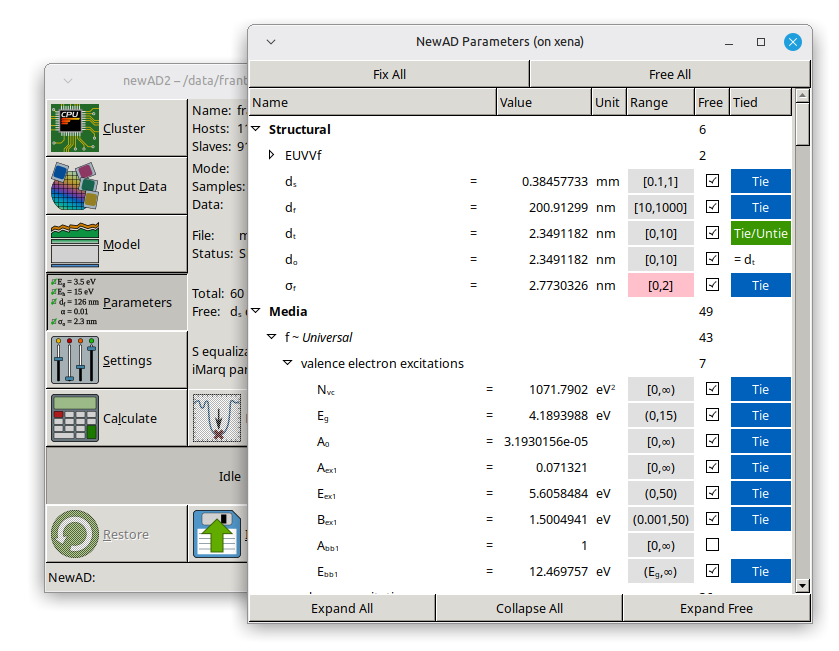
A tree list of all model parameters, grouped the same way they are structured internally (groups can be expanded/collapsed). Columns: Name (group or parameter name), Value (value, editable), Unit, Range (see below), Free (checkbox; for groups, the number of free parameters inside), a column without a header with colored buttons: Tie on parameters (for tying parameters together – clicking it switches into a selection mode in which the selected parameter can be tied to others sharing the same unit) and Save on some groups (see below), Tied (shown only while in tying mode). Above the list are the Expand All/Collapse All/Expand Free buttons (expands only groups containing free parameters), and, while a fit is running, Show All as well (normally only free parameters are shown during a fit). Outside a running calculation, Fix All/Free All are also available. Selecting a row in the list also determines which parameter is offered in the Minimum window.
Holding the mouse over the name of a parameter (the Name column) for a while shows a tooltip with the name under which the parameter is known in the command line mode (par, let, fix, free, ...) and in the model (for example in the parameter ranges); in the list the parameters are otherwise shown by their "nice" names.
The Range column shows the parameter's current bounds as a button in the form [lower,upper) (a closed or open bracket depending on whether that bound itself belongs to the allowed range or not); an unlimited bound is shown as ∞, a bound tied to another parameter is shown as that parameter's name. The button's background color hints whether something is off with the bounds: light gray is the normal state, light pink signals a problem (a bound has mismatched units, or the parameter's current value lies outside the allowed range), and a color in between means one of the bounds is tied to a parameter from a different group, which may not make sense. Clicking the button (available only outside a running calculation) opens a Range of parameter name dialog with a separate row for the lower and upper bound – an Unlimited checkbox (the bound is not limited), a numeric field for the bound's value, and a Closed checkbox (the bound itself belongs to the allowed range, i.e. ≤/≥ rather than a strict </>); a bound tied to another parameter cannot be edited here, the dialog just states which parameter it is tied to. Confirming with OK sends the new bounds to the backend.
Groups of parameters that can be saved to a file have a light brown Save button in the column without a header, which also holds the Tie buttons. It appears on the group of static parameters of an advanced model (Static → for example c-Si or a-Si) and on a medium described by the Universal model (Media → id ~ Universal). Clicking it does the same as the par save command in the command line mode: the current parameter values are written to a file in the working directory (cSi.par, aSi.par, Universal-id.par); see Universal dispersion models and c-Si. The progress is reported in the status line.