 |
| newAD2gui – Output
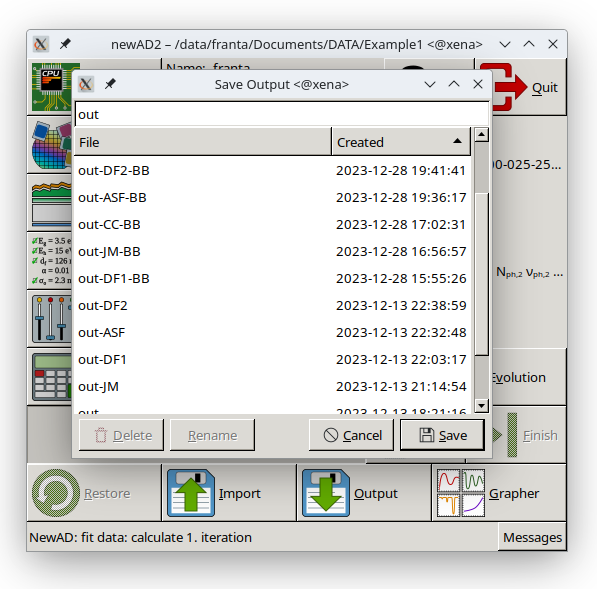
The Output button opens the Save Output dialog for saving the current state – the model, the parameter values and the computed results – to a file (equivalent to the text-mode output command). A file saved this way can later be loaded again through the Import window.
The dialog has a text field for the file name at the top, pre-filled with the string out, and below it a table of previously saved out files from the working directory (name, creation time) – clicking a row in the table fills the field with that file's name. The Save button is only active while the file name field holds non-blank text; it saves the current state to the given file, and if a file with that name already exists, a confirmation dialog appears, which also warns if the existing file does not look like a newAD2 out file based on its content. At the bottom left are the Delete and Rename buttons for managing files directly from this dialog – there is no need to launch an external file manager for routine cleanup. Delete removes the selected file, after a confirmation prompt; the table refreshes immediately after deletion, and the dialog itself stays open, so several old files can be deleted one after another in a single sitting. Rename lets the selected file's name be edited directly in the table (confirmed with Enter, cancelled with Esc), and asks before overwriting if a file with that name already exists. Both buttons are only active when a row is selected in the table. Unlike the similar table in the Model window, no row here is protected against deletion or renaming – out files have no “currently running” counterpart.