 |
newAD2gui – Restore / Import
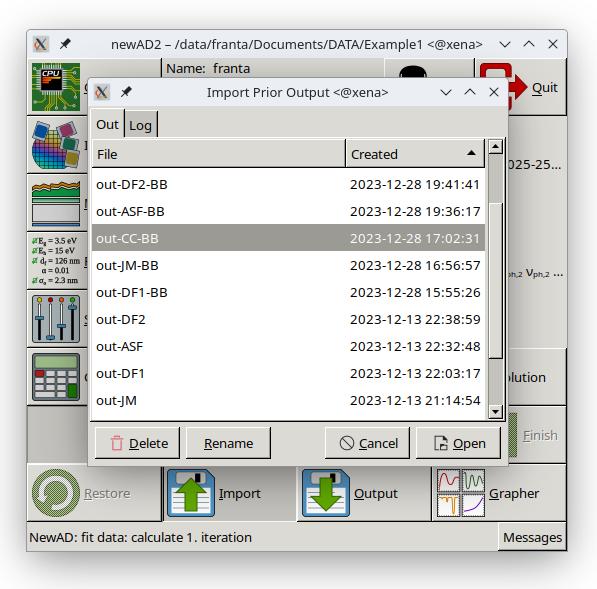
The Restore and Import buttons both restore a previous newAD2 state, but from a different source. Restore resumes an interrupted calculation from the restore file that newAD2 continuously saves to disk while running – the button is only available if such a file exists in the working directory, and pressing it needs no further dialog. Import, on the other hand, opens a dialog window for manually choosing and loading any previously saved file.
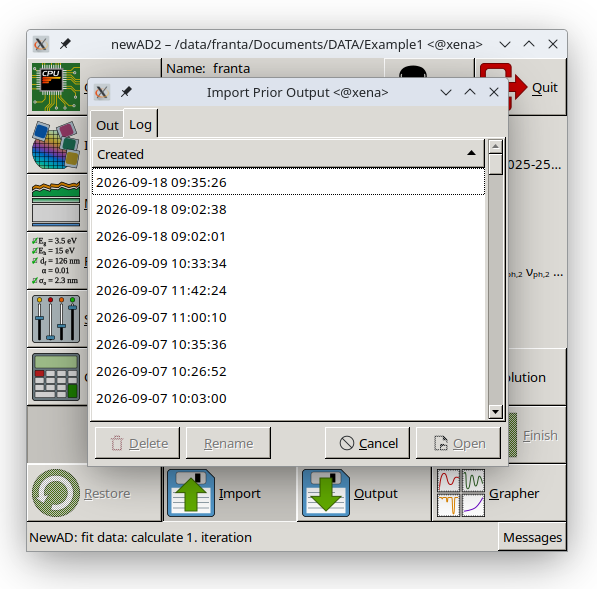
The window opened by the Import button (equivalent to the text-mode import command) has two tabs. The Out tab offers .out files from the working directory, the Log tab offers .log files from the log/ subdirectory; both list the creation time. The lists are rescanned every time the window is opened. Double-clicking an entry (or the Open button) loads the state from the chosen file.
At the bottom left of this window are the Delete and Rename buttons for managing files directly from this dialog – there is no need to launch an external file manager just for routine file cleanup (deleting old files or renaming them). Delete removes the selected file, after a confirmation prompt; Rename lets the selected file's name be edited directly in the table (confirmed with Enter, cancelled with Esc), and asks before overwriting if a file with that name already exists. Both buttons are only active when a row is selected in the table, and both only work in the Out tab – in the Log tab they are unavailable, since log files are neither deleted nor renamed from here. The corresponding list refreshes immediately after a delete or rename.